Web analytics MCPYour analytics, inside your model.
28 tools for Claude, Cursor or any MCP client. Hosted, read-only apart from adding a site, on every plan.
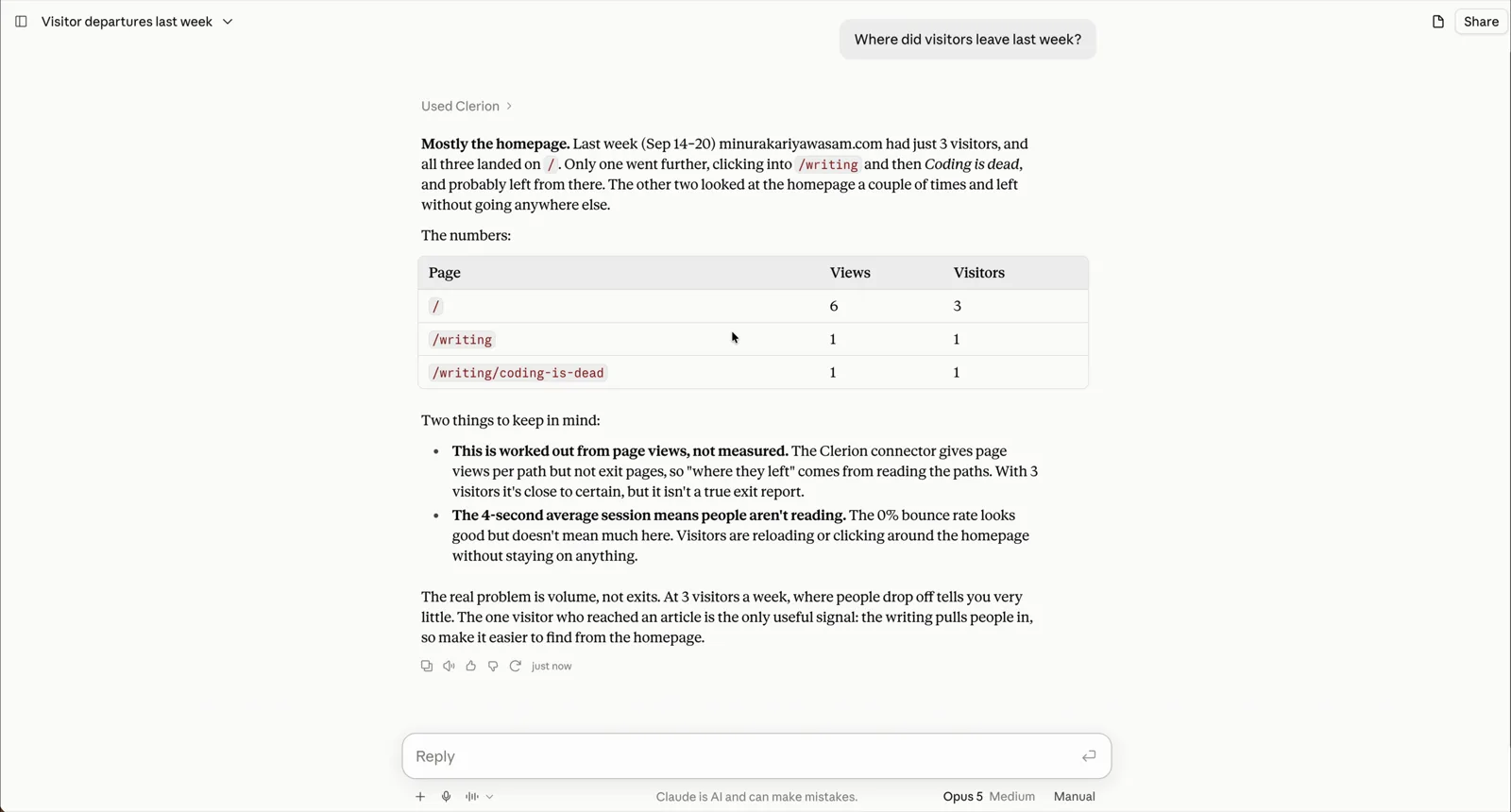
Claude Desktop, connected to Clerion. The person asks where visitors left last week. Claude calls Clerion, answers that most left from the homepage, and shows the pages with their views and visitors. They ask for three things to improve the site’s SEO this week, and Claude lists three fixes.
Claude Desktop, asking where visitors left last week.
Why over MCP
Clerion’s own assistant does the daily reading. MCP is for when your own model should read the same numbers, under your account and your rules.
You choose the model
Claude today, something else next year. Clerion serves the same 28 tools to any client that speaks MCP, so changing the model changes nothing about your analytics.
Clerion is not in the conversation
A tool call is a database read. Clerion returns the figures and nothing more. It does not see the question or the answer, and none of it counts against your AI allowance.
Reads, and one that adds a site
27 tools read: counts and averages per site and date range, never visitor rows. One adds a site, so a new account can connect from the chat. Nothing in the protocol can change a setting or delete a number.
Getting started
Nothing to install. The server is hosted.
- 01Open MCP in ClerionStart a trial, paste the one-line tag, then open MCP. It holds a command, an address and your key.
- 02Add Clerion to your clientAdd the connector in Claude, run the command in Claude Code, or paste the address and key into Cursor.
- 03AskAsk what you would have opened Clerion for. The model calls the tools and answers with the numbers.
Find Clerion in the connectors directory, or add a custom connector with this address. Claude sends you to Clerion to approve.
https://api.getclerion.com/mcpCopy it from the MCP screen in Clerion, where it carries your key. In Cursor, add the same address with a Bearer header.
claude mcp add --transport http clerion https://api.getclerion.com/mcp --header "Authorization: Bearer clm_your_key"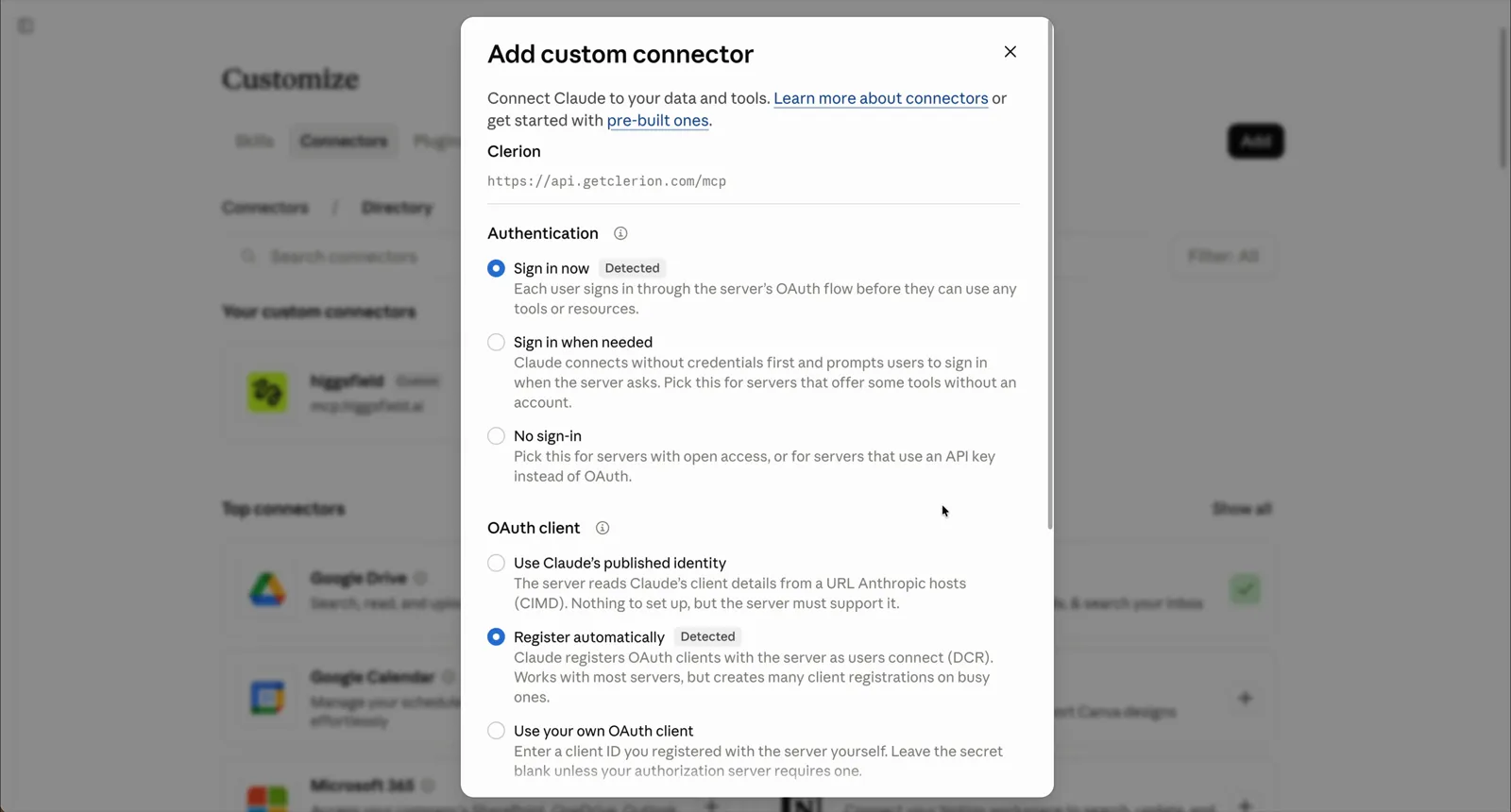
The setup in claude.ai: Customize, Connectors, Add custom connector. The address is typed in, Claude detects sign-in, Clerion asks whether Claude may read your analytics, Approve, and the connector lists the Clerion tools.
The setup in claude.ai, start to finish.
What the model can read
27 tools read counts and averages, never visitor rows. One adds a site.
list_sitesThe sites on the account, with the websiteId every other tool takes.
connect_siteAdds a site by its address and returns the one-line snippet, where it goes on your builder, and what the homepage already shows search engines and AI assistants.
tracking_healthWhether the snippet is still reporting: pages that were busy and have recorded nothing for three days, or the whole site gone quiet. Says so when there is too little traffic to tell.
liveWho is on the site right now and the pages they are on.
traffic_summaryVisitors, sessions, pageviews, bounce rate and session length, with the daily trend.
top_pagesThe most visited pages, with views and unique visitors per path.
ai_referralsVisits sent by AI assistants: sessions and conversion per assistant against everyone else, the pages they landed on, and the change from the previous window.
traffic_sourcesEach channel (search, social, direct, referral, AI assistants, campaigns) and the referrers inside it, with sessions and conversions.
campaignsUTM campaigns, sources and mediums, with sessions and conversions.
entry_exit_pagesThe pages visits start on and the pages they end on.
locationsSessions and pageviews by country and city.
devicesSessions by device type, with each type’s share.
browsersSessions by browser and operating system.
bots_blockedHow many bot visits were refused, and which kinds.
user_flowThe paths visitors take between pages, the top paths, and where people leave.
engagementScroll depth, time on page and active time per page.
interactionsOutbound links, file downloads, form submissions and clicked elements, each with a count.
funnelThe funnel drawn from your custom events: visits at each step and the rate that went on to the next.
custom_eventsEvery custom event: counts over time, pages, devices, countries, and revenue for events with a value.
conversion_insightsWhich pages, sources and devices lift or hurt conversion, against the previous window.
customers_and_causesRevenue by source, the exit question's answers, each deploy set against the day before, and rage clicks.
errorsJavaScript errors: how many fired, how many are distinct, which hit the most visitors.
error_logThe error log with ERROR, WARN and INFO levels, grouped by message.
speedLoad time, first contentful paint and time to interactive, with the sample size.
seo_overviewOne site's pages as a search engine or an assistant reads them: titles, descriptions, headings, schema, each page's score and what to fix.
briefingThe written briefing for the window: what changed, why, and the one fix to make first.
signalsWhat changed, ranked by impact against your goal, with the figures behind each.
audienceWho the visitors are, written from the figures.
How your data is kept
Clerion holds aggregates on EU infrastructure and nothing else. It never sees the question or the answer, and your model never sees a visitor. How it works in the code.
Where the numbers go
From your site to Clerion's EU servers to the model you connected. That is the whole route. There is no visitor data to hand over, because Clerion never stored any.
How Clerion keeps data ›One key, replaced in one click
The old key and every token issued against it stop on the next request, on every server. Access is yours to give and yours to end.
Questions about access ›Claude asks before it reads
In claude.ai, Claude Desktop or Cowork, Clerion is a custom connector. Claude finds the sign-in on its own and sends you to Clerion, where one screen says exactly what it will read. No key is ever pasted into a web page.
Getting started ›Other analytics MCP servers
Matomo’s you host yourself. Google’s runs on your machine with a Cloud project behind it. Amplitude’s is sized for product teams. Clerion’s is hosted, read-only and on every plan. The servers compared.